> ## Documentation Index
> Fetch the complete documentation index at: https://captions.ai/llms.txt
> Use this file to discover all available pages before exploring further.
# AI Creator Video Generator Guide
> Create AI videos without a camera using Captions AI Creator. Write a script, pick an avatar, and generate talking videos with AI Echo.
Use AI Creator to generate a video based on a script.
Use AI Echo to create a customized video narrated in your own voice, allowing you to adjust the narrator's pace, tone, and pronunciation.
# Generate Videos Without a Camera Using AI Creator
## Generate a Video
* Prompt to video: Use your own script, enter a prompt, or use [AI Echo](/help/docs/project/ai-creator#ai-echo)
* [AI Ads](/help/docs/project/ai-ads): Automatically generate a UGC-style ad from a website
* Write or paste your own script
* Enter a prompt and we'll generate a script for you
* Use [AI Echo](/help/docs/project/ai-creator) to record your voice. The avatar you choose will The exact tone, intonation, and pronunciation will be imprinted on the creator you choose.
* Choose from our list of community avatars
After your video has been generated, you can edit and export your video
## AI Echo
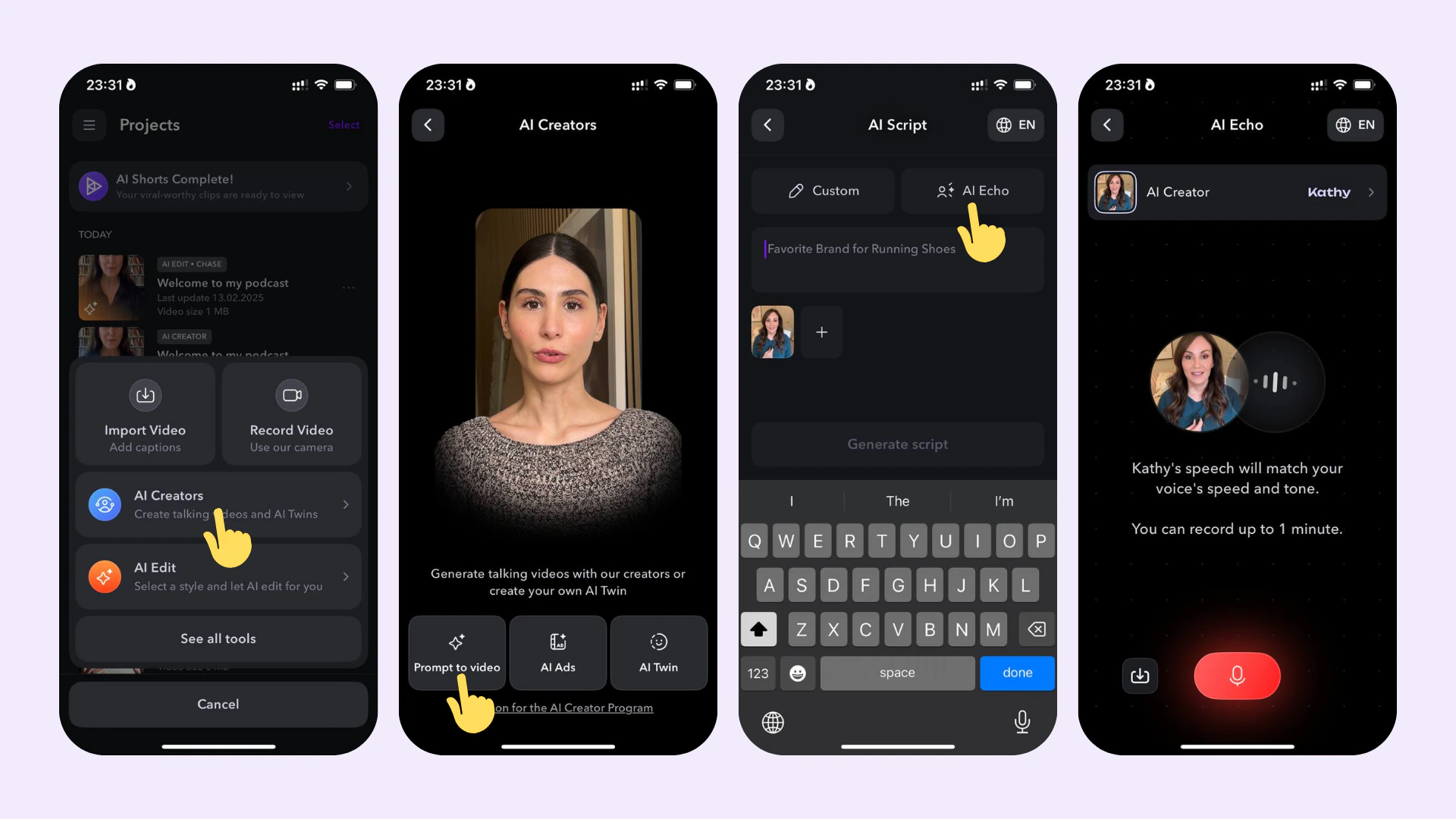
AI Echo allows you to generate AI Creator videos with extreme precision. Rather than typing or pasting your script, simply record your script how you like, and the avatar you choose will have the exact tone, intonation, and pronunciation as your original recording.
To generate an [AI Creator](/help/docs/project/ai-creator) with AI Echo:
1. Navigate to "AI Creator"
2. Rather than pasting a script, choose "AI Echo"
3. Choose your language
4. Record your script in the way you'd like it to be read by the avatar or upload a voice memo.
## Supported Languages
You can generate videos in the following languages: Arabic, Chinese (simplifed), Chinese (traditional), Czech, Danish, Dutch, English, Finnish, French, German, Greek, Hebrew, Hindi, Hinglish, Indonesian, Italian, Japanese, Korean, Malay, Polish, Portuguese, Romanian, Russian, Slovak, Spanish, Swedish, Tamil, Turkish, and Ukrainian.
## Frequently Asked Questions
Yes, all videos made using AI Creator can be used for commercial use. Please read more in our [Terms and Conditions](http://captions.ai/legal/terms).
AI Creator scripts are limited to 1 minute and your script must be between 10 and 800 characters. Each space and line break counts as one character.
You can create AI videos in the following languages: Arabic, Chinese (simplified), Chinese (traditional), Czech, Danish, Dutch, English, Filipino (Tagalog), Finnish, French, German, Greek, Hindi, Hinglish, Indonesian, Italian, Japanese, Korean, Malay, Polish, Portuguese, Romanian, Russian, Slovak, Spanish, Swedish, Tamil, Turkish, Ukrainian.
 To generate an [AI Creator](/help/docs/project/ai-creator) with AI Echo:
1. Navigate to "AI Creator"
2. Rather than pasting a script, choose "AI Echo"
3. Choose your language
4. Record your script in the way you'd like it to be read by the avatar or upload a voice memo.
## Supported Languages
You can generate videos in the following languages: Arabic, Chinese (simplifed), Chinese (traditional), Czech, Danish, Dutch, English, Finnish, French, German, Greek, Hebrew, Hindi, Hinglish, Indonesian, Italian, Japanese, Korean, Malay, Polish, Portuguese, Romanian, Russian, Slovak, Spanish, Swedish, Tamil, Turkish, and Ukrainian.
## Frequently Asked Questions
To generate an [AI Creator](/help/docs/project/ai-creator) with AI Echo:
1. Navigate to "AI Creator"
2. Rather than pasting a script, choose "AI Echo"
3. Choose your language
4. Record your script in the way you'd like it to be read by the avatar or upload a voice memo.
## Supported Languages
You can generate videos in the following languages: Arabic, Chinese (simplifed), Chinese (traditional), Czech, Danish, Dutch, English, Finnish, French, German, Greek, Hebrew, Hindi, Hinglish, Indonesian, Italian, Japanese, Korean, Malay, Polish, Portuguese, Romanian, Russian, Slovak, Spanish, Swedish, Tamil, Turkish, and Ukrainian.
## Frequently Asked Questions